Wednesday, June 9, 2010

Update on the Mobile Device Strategy Project

As promised in my recent about about our mobile device strategy project, here is the finished report from the 30 days of analysis completed by our intern, Ankur Seth.

A few take home lessons:

It's clear that leading practice is to use 2D Bar codes to identify patients, medications, and labs. 3D Bar codes are not widely deployed in outpatient or inpatient areas in the US.

Devices are evolving rapidly and anything you buy today will be obsolete quickly. It's best to avoid device or vendor lock-in if possible, using standards-based or modular components that enable rapid replacement of the infrastructure.

There are many different use cases and requirements in different workflows - Emergency Department, ICU, Ward and Clinic.

There is not a one size fits all solution.

The recommendations in brief are:

Attempt to stay device neutral through the use of web-based or other thin client technologies. For example, Apple has committed to train our developers to create iPod/iPad applications that are just front ends for our underlying web-based applications. We could do the same for the recently announced Dell Streak, Google Nexus One , HP, and RIM mobile devices.

Put bar code reading equipment in each Emergency Department bay and ICU room, since these areas are limited in number and generate a large volume of lab samples.

Make bar code printers available at the bedside in the ED and ICUs, since any workflow which uses centralized printing or batch printing of labels at registration can cause mislabeling errors.

For the ward locations, make mobile printers available on carts so that labels can be printed at the bedside without buying and supporting 500+ printers.

Application and infrastructure ‘fit’ into the user work flow is important and is the major factor affecting the adoption of mobile devices in clinical settings.

Our next step to followup on this study is to test various devices and printers, evaluating usability, supportability, and cost in various clinical locations.

I hope you find this report useful. Comments are welcome.

Tuesday, June 8, 2010

A New Intranet for BIDMC

Today, BIDMC replaced its intranet with a modern, secure, content managed application (pictured above), enabling us to retire our original intranet from 1998.

It's been a joint effort of Corporate Communications and Information Systems.

The process started by gathering requirements from hundreds of stakeholders.

The requirements were turned into a site specification and information architecture (the site's organization and navigation).

From there we developed wireframes, then graphical mock ups.

We coded and tested the site then migrated thousands of pages, documents, and applications.

The end result includes numerous personalization and social networking features (favorites, tag clouds, departmental intranets), single signon, and secure remote access via an Imperva appliance that is invisible to the users, who have the same experience on and off the network. Here's the announcement we sent out, which highlights our change management strategy - the old and new intranets run in parallel for 60 days to enable mastery of the new before retirement of the old.

"Welcome to Your New BIDMC Portal

Tuesday, June 8, marks the beginning of a new era for staff as BIDMC launches its new Portal – portal.bidmc.org. The new Portal offers significant improvements for completing work-related tasks, as well as a host of new communications tools and opportunities.

“We’re excited to launch the new Portal and believe it will provide staff with a much more enjoyable web-based working experience,” said Judy Glasser, Senior Vice President, Communications. “Whether you are a clinician, researcher or administrative staff member, you will find the new Portal much easier to navigate. And, with the new Search function, you’ll be able to find everything you’re looking for much more quickly. You can also customize your ‘My Links’ on the homepage so you have immediate access to your most-used pages and forms. Set aside some time and explore all it has to offer.”

New security requirements mean that all staff now need to sign-in using their ITS username and password. The bonus for those who use multiple applications is that single sign-on means that once you sign-in you can use all the ITS-based applications you are authorized to use without having to repeatedly re-enter. “For physicians and nurses, especially, the new single sign-on function is a major time-saver,” said John Halamka, Chief Information Officer. “Clinicians have been asking for this for years, so it’s nice to finally be able to offer single sign-on for most applications.”

Note that just about every application is available remotely from home or while you're traveling. The Policies, Procedures, Guidelines and Directives (PPGD) and Paging links are not yet available remotely but will be soon, said Halamka.

The new Portal offers consistent, easy-to-follow navigation across all pages, such as:

Section Tabs – At the top of each page you’ll find tabs for the new Portal’s main sections; Applications, Clinical, Research, and Employee Central.
The top right corner of each page contains quick-links to a variety of important programs, including: Web Outlook E-mail, Phone Directory, Pager, PPGD, BIDMC Today and the Events Calendar.
The “Portal Help” button at the top of each page links to a help section that contains video tutorials, Frequently Asked Questions (FAQs), and more.
Text Size can be changed on any page by clicking on the A’s at the top of each page.
The countdown clock at the top of each page shows how much time you have left in your Portal session. You can work in the Portal for an unlimited amount of time, as long as you are actively working. Your Portal session will automatically expire if you stop working (clicking on a link or hitting “enter”) for 20 minutes. The 20-minute time-out clock automatically resets to 20-minutes after each mouse-click or “enter” stroke.
The “My Links” module on the homepage allows you to add customized links to Portal pages and forms, or external websites. The Clinical, Research, Education, and Employee Central also display your “5 Most Used Links” in those sections. (Note: IS is developing a “My Apps” module that will allow you to add your most-used applications that will be available for use by this fall.)

Since January, the Communications Web Team has trained more than 200 Portal Editors who are responsible for the publishing and upkeep of content on departmental pages, forms and Intranets. Click here to view a list of all Portal editors and their departments.

If you are having trouble finding something on the new Portal that you used on the old Portal, please use the new Search function, which includes a drop-down menu to narrow your search. If you still can’t find it, please e-mail the Communications team at portalhelp@bidmc.harvard.edu .

The old Portal is no longer being updated so it may contain documents and policies that are out of date or no longer in compliance. It will be retired in 60 days. As of June 8, we ask that you use the old Portal only when you can’t find an old document or access something you need on the new Portal."

Monday, June 7, 2010

The Community Health Data Initiative

Institute of Medicine President Harvey Fineberg and HHS Secretary Kathleen Sebelius launched the Community Health Data Initiative on June 2 at an IOM Forum in Washington, D.C. The initiative represents the hard work of many people, especially HHS CTO Todd Park.

The idea is simple - make de-identified HHS data sets available free of charge and encourage developers/researchers/public health agencies to create innovative applications which share the data in novel ways on the web, your mobile phone, and via the iPhone app store. Clinicians, patients, and payers will all be informed and empowered by this new data liquidity.

What is the plan?

Per HHS

"We will be providing to the public, free of charge and without any intellectual property constraint, a Community Health Data Set harvested from across HHS – a wealth of easily accessible, standardized, structured, downloadable data on health care, health, and determinants of health performance at the national, state, regional, and county levels, as well as by age, gender, race/ethnicity, and income (where available). This data set will consist of hundreds (ultimately, thousands) of measures of health care quality, cost, access and public health (e.g., obesity rates, smoking rates, etc.), including data produced for the Community Health Status Indicators, County Health Rankings, and State of the USA programs."

For an example of the data sets available see the CDC's website.

For an overview of the launch including sample applications see this You Tube Video.

Per my earlier blog post, The Healthy Communities Institute has demonstrated the power of publicly available data to inform policymaking in cities and counties.

I look forward to the new products and positive impacts on quality, efficiency and safety catalyzed by the Community Health Data Initiative. Definitely worth watching over the next few months.

Friday, June 4, 2010

Cool Technology of the Week

BIDMC has been working hard to define its mobile device strategy over the past 4 weeks and we've learned a great deal from the work of our Intern, Ankur Seth. I'll post his findings soon.

One of the devices we considered was the iPod Touch with an integrated Barcode Scanner/Magstrip reader from Linea-Pro.

We have many varied use cases for laboratory and medication management workflow. All involve scanning patient wrist bands, scanning medications/tubes of blood and scanning/swiping employee badges.

Having a development platform with a graphic user interface, long battery life and WiFi capability gives us significant flexibility without investing in an expensive, limited dedicated device.

The iPod Touch is easy to purchase, support, and use. It's a consumer friendly device.

Adding a laser scanning bar code reader makes it an impressive clinical tool.


An Apple consumer device improving clinical care workflow - that's cool!

Thursday, June 3, 2010

My 2010 Summer Vegetable Garden

This spring, I started my lettuce (Arugula, Oak Leaf, Red Salad Bowl, Red Verona Chicory, Batavian Endive and Garden Cress) in cold frames.

I grew spinach in pots, sprouted numerous seeds (sugar peas, corn, long beans) and started my tomatoes.

Memorial Day is my family's traditional day to switch from the Spring garden to a Summer garden. We harvested our greens (about 50 pounds of lettuces this year) and shared them with family and friends.

Our 2010 Summer garden includes heirloom species from Russell's Garden Center in Wayland, vegetables from Volante Farms in Needham, and seeds from Kitazawa Seed Company. Here's the inventory:

Basil - Sweet
Beets - Chioggia heirloom
Borage
Broccoli
Cabbage - Red
Carrots - Atomic Red, Solar Yellow, Cosmic Purple, Lunar White
Corn - Early Sunglow Hybrid
Cucumber - Sooyow Nishiki
Eggplant - Dewako One Bite Hybrid
Parsley
Rosemary
Sage
Squash - Winter Squash Hybrid Kurinishiki, Hokkaido Blue Squash, Yellow crook neck
Thyme
Tomatoes - Sun Gold, Super Sweet 100, Suncherry
Turnips - Tokyo Cross hybrid

We'll harvest everything in early August before our annual vacation to the Eastern Sierra and then plant our Fall garden. More to come when I harvest!

Wednesday, June 2, 2010

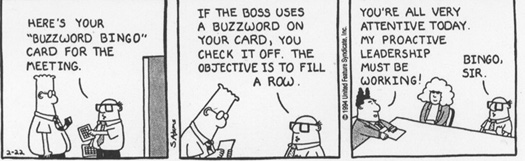
Buzzword Bingo

Have you ever played Buzzword Bingo?

It's been featured in a classic Dilbert comic strip.


Recently I was asked to deliver a brief keynote to a group of emerging high tech companies from New Zealand. To prepare for the speech, I searched the tech literature for those words which seem to be at the peak of the Gartner Hype cycle.

My advice to the New Zealand high tech community seeking to market their products in the United States is to simply state:

"My product is green certified, embracing a virtualized Linux private cloud computing infrastructure delivered via a modular, scalable, service oriented architecture based on social networking concepts and incorporating business intelligence capabilities. We've written it in Google Apps using a federated and distributed database structure that is customer focused, mobile (runs on the iPad/iPhone/iPod!), and open source, developed with agile methods and Lean principles. Read about it on Twitter, Facebook, LinkedIn, our Blog, or RSS Feed."

Above you'll find a custom Bingo card created with Business Buzzword Bingo.com

The folks in New Zealand have great products and we'll hear the results of their national high tech competition soon.

In the meantime, listen to presentations from any of your vendors and bring your Bingo card. My bet is you'll get a Bingo more times than not!

Tuesday, June 1, 2010

The ONC Standards RFPs

I've written previously about the new ONC Standards and Interoperability Framework which embraces National Information Exchange Model principles. As a service to the communities, here are 10 of the 11 RFPs used by ONC to support this effort. I'll post the 11th as soon as it is available.


Next Month, ONC will present its Concept of Operations (ConOps) RFP coordination plan to the HIT Standards Committee. I look forward to hearing more about the coordination of all these efforts.